Cron jobs
WP-Cron is how WordPress handles scheduling time-based tasks.
Several WordPress core features, such as checking for updates and publishing scheduled posts, utilize WP-Cron. The "Cron" part of the name comes from the cron time-based task scheduling system that is available on UNIX systems.
WP-Cron vs server cron - what's the difference?
It is important to note that WP-Cron is different from a server cron and they each have their own pros and cons. The sections below describe briefly how each works and which one we think you should use.
WP-Cron
WP-Cron works by checking, on every page load, a list of scheduled tasks to see what needs to be run.
Any tasks due to run will be called during that page load by the wp-cron.php task scheduler.
Server cron
Server cron (sometimes referred to as system cron) is very much like the name suggests: the cron jobs run on server level, so it doesn't rely on anyone visiting your site in order to run.
Here at Templ we offer server cron for all sites.
Should you use WP-Cron or server cron?
It's worth noting that some plugins require the default WP-Cron in order to function properly. Unless your website is using a plugin that requires WP-Cron to be enabled, we recommend using server cron instead for improved performance.
How to enable server cron
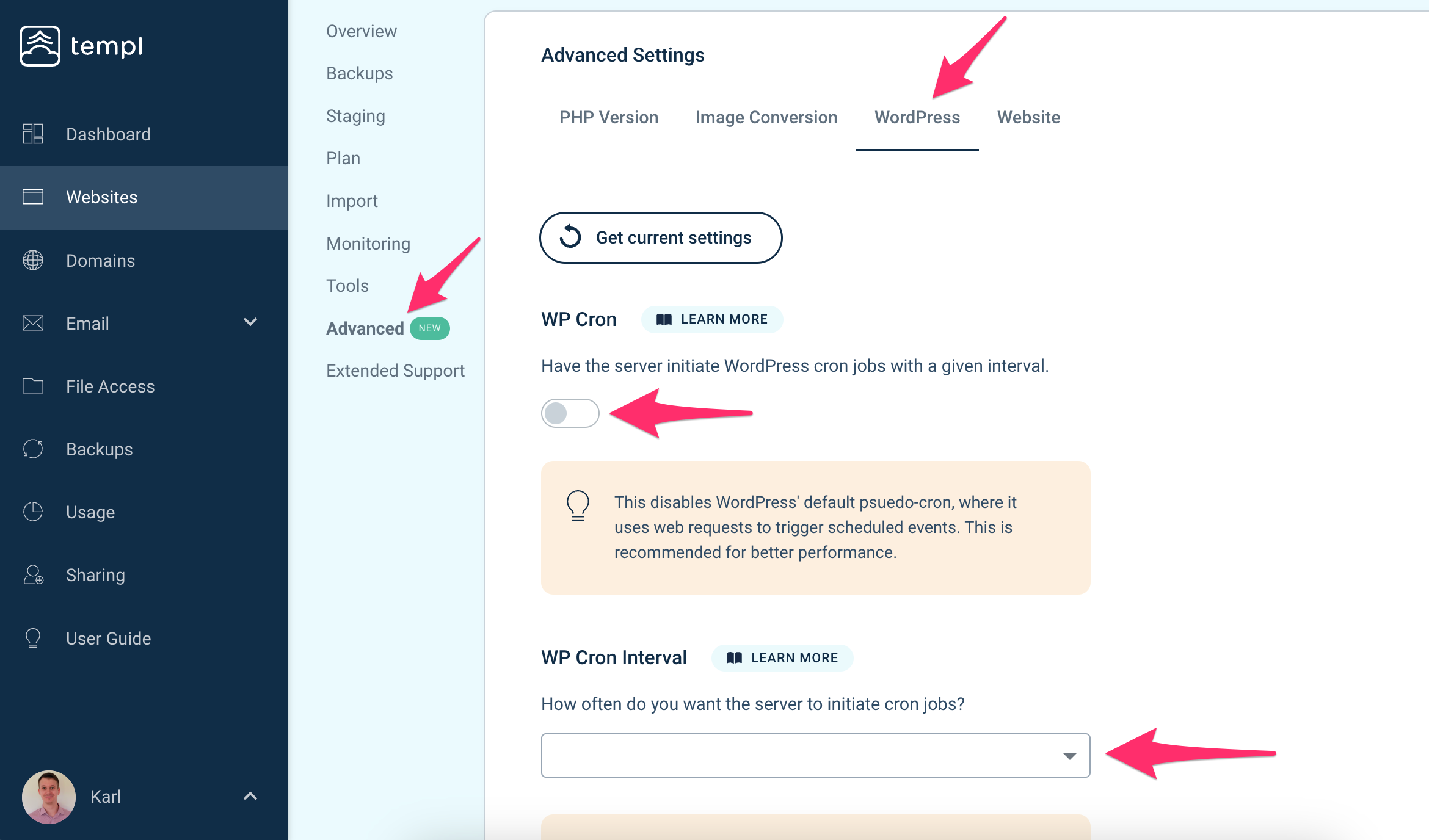
To enable server cron for a website, navigate to the website in the Templ Panel and then click on the Advanced tab, followed by clicking on WordPress. From here you can activate server cron by activating the toggle and then saving the settings.
You can also choose the cron interval, which is how frequent the server cron executes the job due in the queue.
/var/log/timers/cron.log, and any additional custom timers are logged in their own files under /var/log/timers/. See Logs for how to access these files.Custom cron jobs (scheduled commands)
Server cron triggers WordPress' own scheduled tasks (WP-Cron). You can also have a completely custom command run on a schedule directly inside your website's environment - for example a WP-CLI command provided by one of your plugins:
wp my-plugin sync --all
Custom cron jobs are set up by our team. Contact support with:
- which website it concerns
- the command to run
- the desired schedule (we can schedule in your local timezone)
The command runs inside your website's container from the webroot, so WP-CLI and all the other preinstalled tools are available.
Each custom cron job logs its output to its own file under /var/log/timers/, see Logs.