Domain verification
Verifying your domain tells inboxes that Templ is allowed to send email on its behalf, which keeps messages sent from your site out of spam folders. This page explains when you need to do it and how.
Why verify your domain
For the best possible email deliverability for emails sent from your website, the domain should be verified with three CNAME DNS records.
- The domain you want to verify must be in use by a website before it can be verified.
- Your Templ account must be on a paid plan (domain verification is not available during the free trial).
When you need to verify your domain
You only need to verify your domain manually if you are managing DNS externally (and not using our nameservers). Domains using our nameservers will be verified automatically.
- Along with the three CNAMEs, you also need to add our SPF and DKIM records to your DNS settings in order to ensure email deliverability.
- Verifying your domain and adding our SPF/DKIM is not necessary if you have configured your website to use a third party SMTP provider with an SMTP plugin.
How to verify your domain
Open the Templ Panel and navigate to Email → Domain Verification. You will see a list of your domains that require manual verification along with their verification status. Click on the domain you want to verify and you will see three CNAME records that you need to add to your domain's DNS settings.
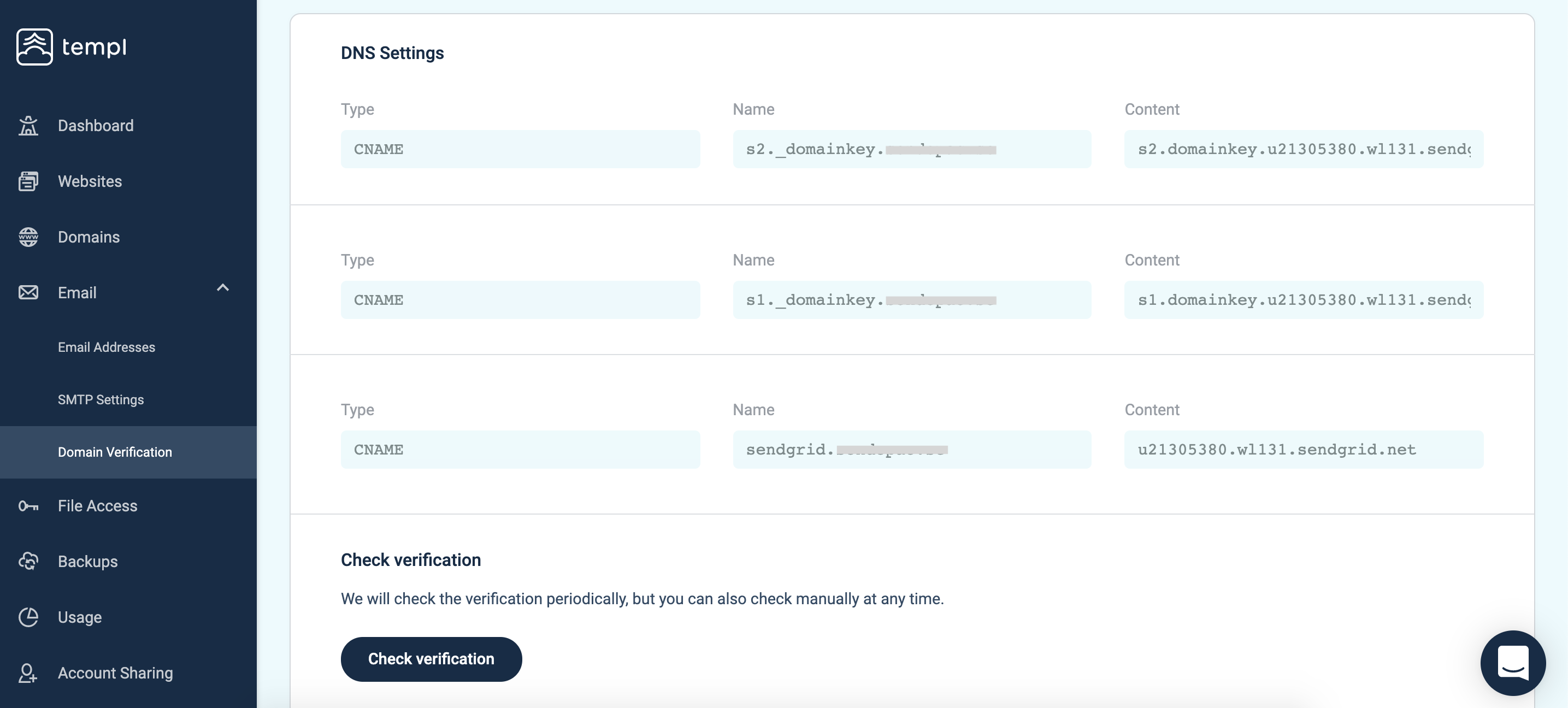
Copy the three CNAME subdomains and add them to your domain's DNS. Once the DNS has updated, the verification will happen automatically, but you can also go ahead and click the Check Verification button to verify manually.
If the DNS records have been added correctly and the DNS has updated then you should see a verification successful message when you verify.
Verify that emails sent from your site are working correctly
Once all DNS records are in place it's a good idea to send a few test emails from your website and make sure that it's working correctly.
An easy way to send test emails from your website is to use the plugin WP Test Email.
For more advanced email deliverability testing we recommend using mail-tester.com.
Troubleshooting failed verification
If the domain verification fails, you may need to wait a bit longer for the DNS to update, and/or make sure that the records have been added correctly.
Need a hand?
In case you need help with domain verification or have any questions, please contact support.
FAQ
My website's IP address is on a blocklist. Does that affect email deliverability?
No. Email deliverability is judged on the IP address of the mail server that delivers the message and on your domain's SPF and DKIM records, not on the IP address your website's A record points to.
Templ websites never send email directly from the hosting server. Outgoing mail goes through dedicated email servers, so the hosting IP is not part of the email delivery chain.
Hosting IPs commonly appear on blocklists that list IP ranges not meant to deliver email directly, which is exactly what a web hosting IP is. Such a listing is not a spam mark, and no removal is needed.